Most teams do not need another dashboard. They need a small internal tool that watches the business, understands context, and takes the next safe step without waiting for a human to open five tabs. That is where OpenClaw agents become useful: not as generic chatbots, but as practical operators for the repetitive work sitting between your existing tools.
This guide shows how to design and build internal tools with OpenClaw agents: intake triage, reporting bots, customer follow-up queues, QA checkers, lightweight admin panels, and approval-driven automations. The goal is not to replace your product engineering process. The goal is to give your team a reliable agent layer that can read, decide, draft, notify, and escalate.
We will build the pattern using simple files, CLI commands, cron jobs, Telegram notifications, and agent sessions. You can adapt the same structure for sales ops, content ops, support, recruiting, finance, or any team where humans keep repeating the same judgment-heavy checklist.
What Counts as an Internal Tool?
An internal tool is any private workflow that helps your team operate the business. Traditional internal tool platforms focus on forms, tables, SQL queries, API actions, and admin panels. Retool, for example, highlights common use cases like REST API UIs, SQL GUIs, dashboards, admin panels, calendar booking tools, and apps built on top of business data. n8n focuses more on connected workflows, including AI agents that use tools, model calls, persistence, and external integrations.
OpenClaw sits in a different but complementary lane. It is strongest when the workflow needs natural language reasoning, files, shell commands, memory, ongoing sessions, and human approval. Instead of only clicking a button on a dashboard, you can ask an agent to inspect the situation, summarize what changed, prepare the action, and ask for approval before touching anything sensitive.
The Internal Tool Pattern
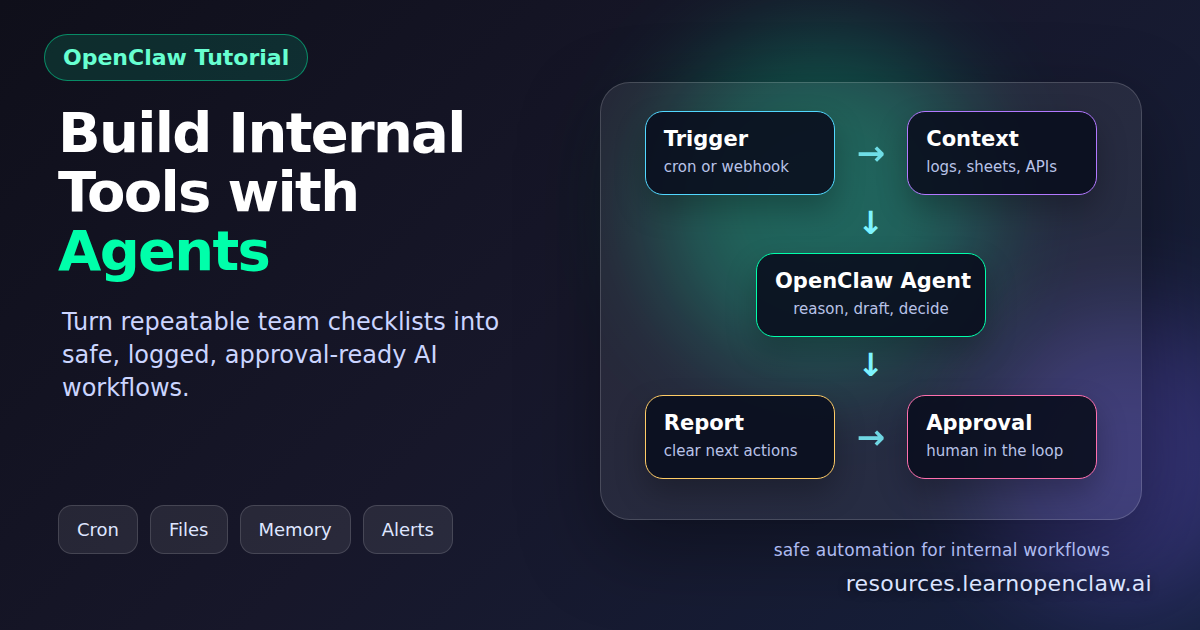
The most reliable OpenClaw internal tools follow a five-part pattern:
- Trigger: a cron job, message, webhook, file change, or manual request.
- Context: files, API results, logs, CRM exports, Google Sheets rows, or WordPress data.
- Decision: the agent classifies what happened and chooses the next safe action.
- Action: the agent writes a report, drafts an update, creates a ticket, sends an alert, or updates a system.
- Approval: risky external actions pause for human confirmation.
This pattern matters because internal tools fail when they become magical black boxes. The best agent tools show their work, keep logs, preserve memory, and make it obvious when a human needs to decide.
Example Tool: Daily Operations Brief
Let us build a daily operations brief. The agent will check a project folder, read recent logs, inspect open tasks, summarize risks, and send a Telegram update. This is intentionally simple, because the same design can later connect to Linear, Gmail, Google Sheets, WordPress, or your own APIs.
Step 1: Create a Workspace Folder
Start by creating a small folder for the internal tool. Keep prompts, scripts, logs, and state together so the agent has a predictable place to work.
$ mkdir -p ~/internal-tools/daily-ops/{logs,state,reports}
$ cd ~/internal-tools/daily-ops
$ touch state/last-run.txt logs/events.log
The state folder stores what the tool remembers between runs. The logs folder stores raw evidence. The reports folder stores finished outputs that humans can review later.
Step 2: Write the Agent Brief
Next, create a clear instruction file. Good internal tools do not rely on vague prompts. They define the job, the data sources, the risk rules, and the output format.
$ cat > brief.md << 'EOF'
You are the Daily Ops Brief agent.

Goal:
Review recent operational context and produce a concise daily report.

Read:
- logs/events.log
- state/last-run.txt
- any files in reports/ from the last 7 days

Do:
1. Identify new events since the last run.
2. Group them into wins, risks, blockers, and recommended actions.
3. Write a report to reports/YYYY-MM-DD.md.
4. If a blocker needs a human decision, make it explicit.
5. Do not send emails, delete files, or change external systems without approval.

Output:
- 5 bullet summary
- Risks
- Recommended next actions
- Questions for Ahmad, if any
EOF
Notice the safety line. For internal tools, that sentence is not decoration. It separates safe autonomous work from actions that need approval.
Step 3: Add a Small Runner Script
The runner script gives OpenClaw a repeatable preparation step. It gathers local context, creates today’s report path, and updates state after the agent finishes. Keep the first version boring. Boring internal tools survive production.
$ cat > prepare-daily-ops.sh << 'EOF'
#!/usr/bin/env bash
set -euo pipefail

ROOT="$HOME/internal-tools/daily-ops"
TODAY="$(date -u +%F)"

mkdir -p "$ROOT/reports"
cd "$ROOT"

cat > "state/today.txt" << STATE
Date: $TODAY
Report path: $ROOT/reports/$TODAY.md
Last run: $(cat "$ROOT/state/last-run.txt" 2>/dev/null || echo "never")
STATE
EOF
$ chmod +x prepare-daily-ops.sh
The agent will call this script from the scheduled job, then read brief.md and state/today.txt before writing the report.
Step 4: Schedule It with Cron
Now schedule the tool. For a daily brief, run it before the team starts work. Use explicit timeouts so a stuck job does not sit forever.
$ openclaw cron add \
  --name "Daily Ops Brief" \
  --cron "0 5 * * *" \
  --session isolated \
  --timeout 300 \
  --message "Run ~/internal-tools/daily-ops/prepare-daily-ops.sh. Then read ~/internal-tools/daily-ops/brief.md and ~/internal-tools/daily-ops/state/today.txt, write the report, update state/last-run.txt, and send a short status update."
Use an isolated session for routine tools when you want clean, predictable runs. Use a persistent or thread-bound session when the tool needs a long-running conversation or shared context.
Step 5: Send a Human-Friendly Notification
An internal tool is only useful if the right person sees the result. Add a notification step that sends the summary to Telegram, Discord, Slack, or whatever channel your team actually watches.
$ openclaw message send \
  --channel telegram \
  --target "-1001234567890" \
  --message "✅ Daily Ops Brief is ready: ~/internal-tools/daily-ops/reports/$(date -u +%F).md"
Do not bury the result in logs. If the tool finds a blocker, say so in plain English. If it succeeds, say exactly what changed. If it needs approval, give the human two or three clean options.
Practical Internal Tool Ideas
Once the pattern is working, you can build several useful tools quickly:
- Sales lead reviewer: read new leads from a sheet, score fit, draft outreach, and ask for approval before sending.
- Support triage agent: group new tickets by urgency, detect repeated complaints, and create a daily escalation list.
- Content QA checker: inspect draft posts for formatting, missing categories, broken links, and SEO issues.
- Finance reminder bot: track invoices, flag overdue payments, and draft polite follow-ups.
- Engineering release assistant: read merged pull requests, summarize changes, and draft release notes.
The best first tool is the one that already has a manual checklist. If a human can describe the process in ten bullet points, an OpenClaw agent can usually help run the checklist and escalate the exceptions.
What Other Tools Cover, and What OpenClaw Adds
Retool-style platforms are excellent when your team needs a polished interface on top of databases and APIs. n8n-style workflow builders are excellent when you need visual automation across many services. Those tools solve a real problem: connecting systems and giving operators buttons.
OpenClaw adds a different layer: an agent that can read messy context, use local files, inspect logs, remember prior decisions, operate through CLI tools, and explain what happened. That makes it especially valuable for workflows where the input is not clean enough for a form and the output is not safe enough for fully automatic execution.
In practice, you do not need to choose one forever. Use Retool for the admin UI, n8n for visual integrations, Google Sheets for lightweight shared data, and OpenClaw for the reasoning layer that checks, drafts, summarizes, and escalates.
Security Rules for Agent-Based Internal Tools
Internal tools often touch sensitive systems, so design guardrails from day one:
- Store API keys in environment files or secret managers, not in prompts.
- Use read-only credentials until the tool has proven reliable.
- Require approval for emails, public posts, payments, deletes, and account changes.
- Log every external action with timestamp, actor, and result.
- Keep prompts and scripts in version control so changes are reviewable.
- Prefer narrow tools over broad access. An invoice bot does not need production database write access.
The biggest mistake is giving an agent broad permissions because it feels convenient during setup. Start narrow. Add power only after you have logs, tests, and a rollback path.
Testing Before You Trust It
Before a new internal tool runs unattended, test it in dry-run mode. Feed it old data and compare its output to what a human would have done.
$ cp logs/events.log logs/events.test.log
$ ./prepare-daily-ops.sh
$ openclaw cron list
$ openclaw cron run <job-id>
$ sed -n '1,120p' reports/$(date -u +%F).md
Look for three things: did it miss anything important, did it invent anything unsupported, and did it ask for approval at the right time? If the answer is yes, no, and yes, you are close.
FAQ
Should every internal tool use an AI agent?
No. If the workflow is deterministic, use a normal script. Use OpenClaw when the tool needs judgment, summarization, messy context, or human-friendly explanations.
Can OpenClaw replace Retool or n8n?
Usually no, and that is fine. Retool is better for polished internal UIs. n8n is better for visual workflow wiring. OpenClaw is better as the reasoning and operations layer around files, CLI tools, memory, and approvals.
What is the safest first internal tool to build?
Start with a read-only reporting tool: daily summaries, QA checks, lead scoring, or release notes. Once the team trusts the output, add approval-based actions.
How do I prevent an agent from doing something risky?
Use narrow credentials, explicit instructions, dry-run modes, approval gates, and logs. Do not give write access until the tool has been tested against real historical data.
Where should prompts and scripts live?
Keep them in a dedicated folder or repository. Store briefs, runner scripts, state files, logs, and reports together so future maintainers can understand the tool quickly.
Final Takeaway
The best OpenClaw internal tools are not giant autonomous systems. They are small, dependable teammates for specific operational loops. Give them clear context, narrow permissions, visible logs, and a human approval path. Start with one painful checklist, automate the boring parts, and let the agent escalate the judgment calls. That is how you build internal tools that people actually trust.