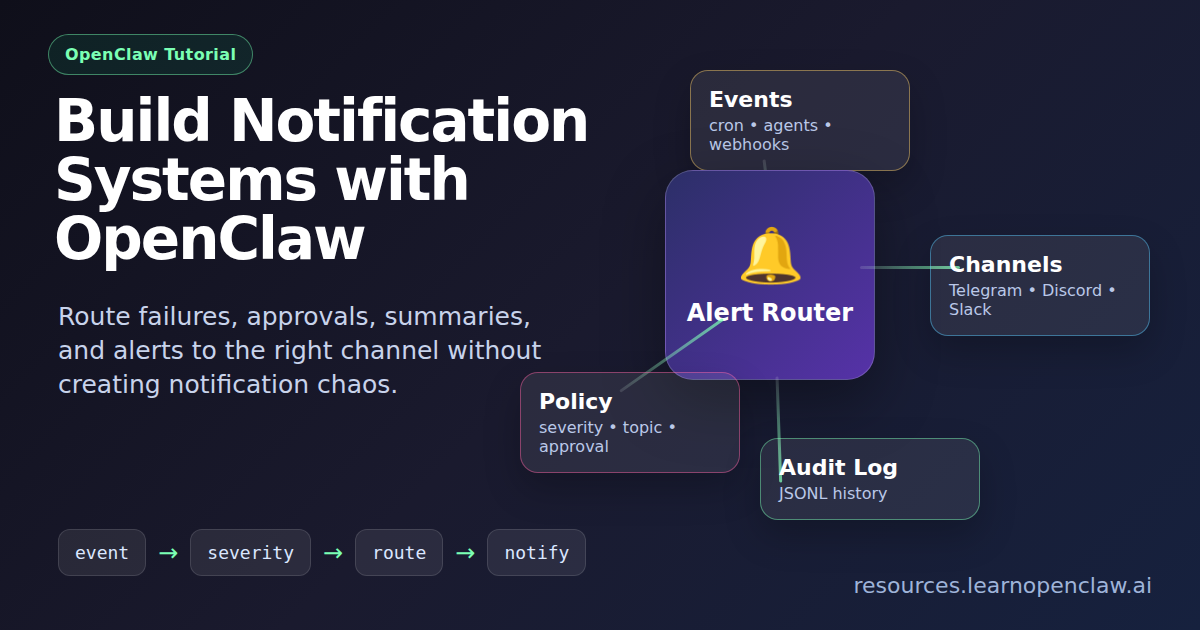
Most notification systems fail for one simple reason: they treat every message like it has the same urgency. A failed backup, a new sales lead, a customer complaint, a successful deployment, and a daily summary should not all land in the same channel with the same tone.
OpenClaw gives you a better pattern. Instead of wiring every automation directly to one chat app, you can build a small alert router that decides what happened, who needs to know, where it should go, and whether it needs action. That turns notifications from noise into an operating system for your work.
In this guide, you will build a practical multi-channel notification system with OpenClaw. The examples use Telegram, Discord, and a local log file, but the same structure works for Slack, email, SMS gateways, webhooks, or custom dashboards.
What We Are Building
The goal is not just “send a message.” The goal is a reusable notification layer your agents and scripts can call from anywhere.
The system has five parts:
- Event source: a cron job, script, webhook, research task, sales workflow, or agent session.
- Alert payload: a small JSON object describing severity, topic, title, message, and optional action.
- Router: a Node.js script that decides which channel should receive the alert.
- Delivery adapters: OpenClaw message calls for Telegram and Discord, plus a local audit log.
- Escalation rules: simple rules for failures, approvals, and quiet summaries.
This is different from a multi-channel chatbot. A bot focuses on conversations. A notification system focuses on routing operational signals. You can have both, but mixing them too early creates noisy agents that interrupt everyone for everything.
Step 1: Create a Notification Payload Format
Start with a small contract. Every automation should send the same shape of data, even if the source is completely different.
{
  "severity": "info",
  "topic": "blog",
  "title": "New draft created",
  "message": "OpenClaw created a WordPress draft and assigned the Tutorials category.",
  "action": "Reply approve to publish or skip to discard.",
  "source": "daily-blog-cron"
}
Use a limited set of severities. I recommend:
successfor completed tasks.infofor summaries and non-urgent updates.warningfor things that need attention but are not broken yet.dangerfor failures, outages, data loss risk, or blocked work.approvalfor decisions that need a human reply.
The important field is topic. Topic lets you separate blog alerts from sales alerts, research alerts, coding alerts, and infrastructure alerts without rewriting every automation later.
Step 2: Create the Router Script
Create a script folder if you do not already have one, then add a notification router.
$ mkdir -p scripts logs
$ touch scripts/notify.js
$ chmod +x scripts/notify.js
Here is a practical starter router. It reads JSON from stdin, formats a clean message, writes an audit log, then sends the alert through OpenClaw.
#!/usr/bin/env node
const fs = require('fs');
const { execFileSync } = require('child_process');

const input = fs.readFileSync(0, 'utf8');
const alert = JSON.parse(input);

const groups = {
  blog: '-5081763980',
  research: '-5230833224',
  coding: '-4873496140',
  sales: '-5019426076',
  ralph: '-5202381207',
  twitter: '-1003519610404'
};

const emoji = {
  success: '✅',
  info: 'ℹ️',
  warning: '⚠️',
  danger: '❌',
  approval: '📝'
};

const topic = alert.topic || 'research';
const target = groups[topic] || groups.research;
const icon = emoji[alert.severity] || emoji.info;

const lines = [
  `${icon} ${alert.title || 'OpenClaw notification'}`,
  '',
  alert.message || '',
  alert.action ? `\nAction: ${alert.action}` : '',
  alert.source ? `\nSource: ${alert.source}` : ''
].filter(Boolean);

const text = lines.join('\n');

fs.appendFileSync('logs/notifications.log', JSON.stringify({
  time: new Date().toISOString(),
  target,
  alert
}) + '\n');

execFileSync('openclaw', [
  'message', 'send',
  '--channel', 'telegram',
  '--to', target,
  '--message', text
], { stdio: 'inherit' });
Notice the design choice: scripts do not need to know Telegram group IDs. They only need to know the topic. This keeps your automation clean and makes future changes safer.
Step 3: Test a Simple Alert
Now send a test alert into the router.
$ cat << 'JSON' | node scripts/notify.js
{
  "severity": "success",
  "topic": "research",
  "title": "Notification router test",
  "message": "The OpenClaw alert router is working.",
  "source": "manual-test"
}
JSON
If the message arrives, the delivery path works. If it does not, check whether the OpenClaw gateway is running and whether the Telegram channel is connected.
$ openclaw gateway status
$ tail -n 20 logs/notifications.log
Step 4: Add Notifications to Cron Jobs
The best place to start is cron, because cron failures are invisible by default. A job can fail at 3 AM and nobody knows until a customer complains. A good notification system turns silent failures into visible, actionable messages.
Here is a safe shell pattern for a cron-managed script. It sends a success alert when the job completes and a danger alert when anything fails.
#!/usr/bin/env bash
set -euo pipefail

notify_success() {
  cat << JSON | node scripts/notify.js
{
  "severity": "success",
  "topic": "blog",
  "title": "Daily blog job completed",
  "message": "A new draft was created and categorized successfully.",
  "source": "daily-blog-cron"
}
JSON
}

notify_failure() {
  cat << JSON | node scripts/notify.js
{
  "severity": "danger",
  "topic": "blog",
  "title": "Daily blog job failed",
  "message": "The job exited before creating a draft. Check the cron run logs.",
  "action": "Review the latest run and rerun after fixing the error.",
  "source": "daily-blog-cron"
}
JSON
}

trap notify_failure ERR

# Your real work goes here.
wp post list --path=/var/www/resources.learnopenclaw.ai --allow-root --post_status=publish --fields=ID,post_title

notify_success
This pattern is intentionally simple. You do not need a monitoring platform to get started. You need a consistent habit: every automation must report completion, failure, or blockage.
Step 5: Route by Severity, Not Just Topic
Some alerts should go to different places depending on severity. A successful backup can go to a daily summary. A failed backup should interrupt the operations channel immediately.
Update the router with an escalation rule:
function chooseTarget(alert) {
  if (alert.severity === 'danger') {
    return groups.ralph;
  }

  if (alert.severity === 'approval' && alert.topic === 'blog') {
    return groups.blog;
  }

  return groups[alert.topic] || groups.research;
}
This is the part most generic notification tutorials miss. Channel selection should be policy, not scattered if-statements across twenty scripts.
Step 6: Add Approval Alerts
OpenClaw is especially useful when a task can do 90 percent of the work, then stop for human judgment. Blog publishing, outbound emails, public tweets, customer refunds, and data deletion should usually use approval alerts.
$ cat << 'JSON' | node scripts/notify.js
{
  "severity": "approval",
  "topic": "blog",
  "title": "New blog post draft",
  "message": "Draft ID 421 is ready: Build Notification Systems with OpenClaw.",
  "action": "Reply approve to publish, skip to discard, or send edits.",
  "source": "wordpress-draft-agent"
}
JSON
The wording matters. Every approval alert should include the object ID, the current status, and the exact reply options. If the human has to ask “what do I do now?”, the notification failed.
Step 7: Keep a Local Audit Trail
Chat apps are not audit logs. Messages get buried, edited, deleted, or missed. Keep a local JSONL log for anything operationally important.
$ tail -n 50 logs/notifications.log
$ grep '"severity":"danger"' logs/notifications.log
That log lets you answer questions like: How many failures happened this week? Which workflow asks for approval most often? Which channel gets too many warnings? This is how you improve the system instead of just adding more noise.
How This Compares to Other Notification Guides
Most articles about notification systems focus on one of three angles: connecting webhooks to Slack, using a hosted alerting service, or deploying the same bot across Telegram, Discord, and Slack. Those are useful, but they usually skip the operational layer.
The stronger OpenClaw approach is to separate event creation from notification policy. Your research cron job should not know where sales alerts go. Your blog automation should not hard-code every Telegram group. Your coding agent should not decide whether a failed deployment deserves an immediate interrupt or a daily summary. The router owns that decision.
This also makes the system easier to teach and maintain. When a new channel appears, you add one adapter. When a new workflow appears, you give it a topic. When Ahmad wants fewer alerts, you adjust policy in one place instead of hunting through every script.
Best Practices for OpenClaw Alerts
- Always say whether action is needed. “No action needed” is a valid and valuable message.
- Use IDs. Include draft IDs, run IDs, post IDs, lead IDs, or file paths.
- Do not alert on every tiny step. Alert on completion, failure, blockage, or human decision points.
- Use summaries for noisy workflows. Ten successful checks can become one daily summary.
- Keep secrets out of messages. Never send API keys, passwords, private tokens, or full environment dumps.
- Make failures plain-English. Translate technical errors into what happened, whether it matters, and what the human should do.
FAQ
Can I use this with Slack instead of Telegram?
Yes. Add a Slack adapter to the router and map one or more topics to Slack channels. The payload format should stay the same.
Should every OpenClaw cron job send notifications?
Every meaningful cron job should report success, failure, or blockage somewhere. For high-frequency jobs, send failures immediately and batch successes into a summary.
What is the difference between a notification system and a bot?
A bot is conversational. A notification system is operational. It routes events, decisions, failures, and summaries to the right place. OpenClaw can do both, but you should design the alert layer separately.
Where should I store channel IDs?
For small systems, a router script is fine. For larger systems, store channel IDs in environment variables or a private config file. Do not hard-code secrets or private credentials in public repositories.
How do I prevent alert fatigue?
Use severity levels, topic routing, summaries, and approval-only interrupts. The test is simple: if a message does not change what someone does, it probably should not interrupt them.
Final Thoughts
A good OpenClaw notification system is not loud. It is disciplined. It tells you when work completed, when something broke, when a decision is needed, and when no action is required.
Start with one router, one payload format, and three rules: every important task reports back, every failure is translated into plain English, and every approval request includes exactly what to do next. That small foundation will make your agents feel dramatically more reliable.