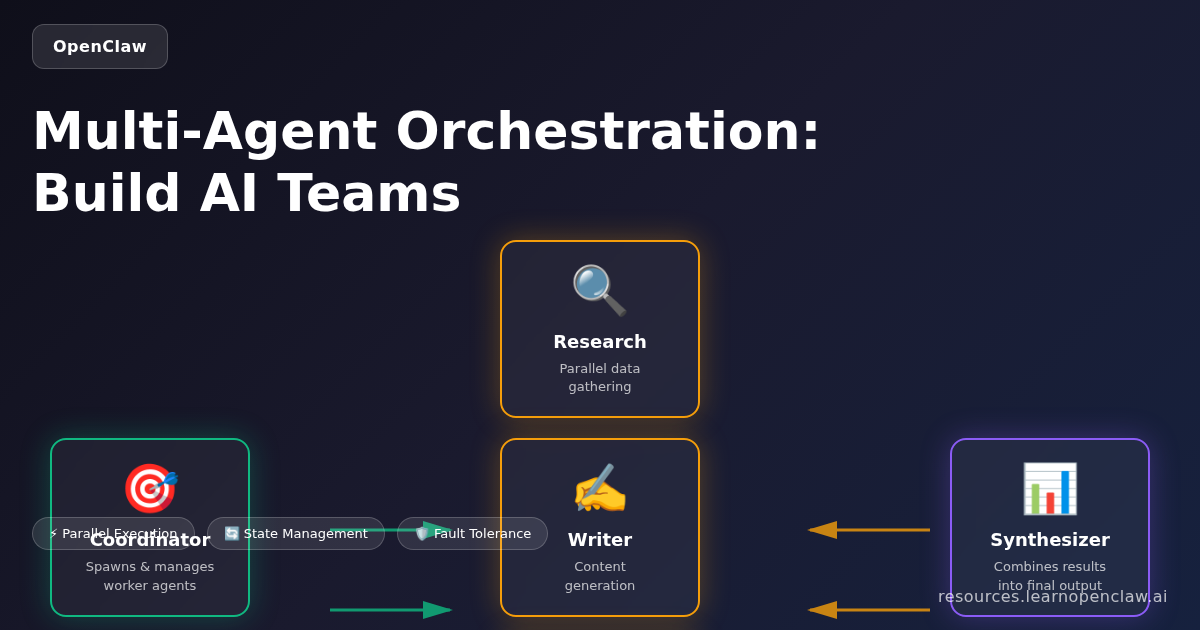
Multi-Agent Orchestration in OpenClaw: Coordinate AI Teams for Complex Workflows
Imagine having a team of AI assistants working together on your behalf—one agent researching competitors, another drafting content, and a third managing your project tasks—all coordinating automatically without manual intervention. This is multi-agent orchestration in OpenClaw, and it’s one of the most powerful features for scaling your AI automation.
In this comprehensive guide, you’ll learn how to spawn isolated sub-agents, coordinate multiple AI agents working simultaneously, pass data between agents, build sophisticated workflows that would be impossible with a single agent, implement fault-tolerant systems, and optimize performance for production deployments.
Why Multi-Agent Orchestration Matters
Traditional AI automation relies on a single agent handling everything sequentially. But real-world workflows are rarely linear. You might need to:
- Run multiple research tasks in parallel while maintaining different contexts
- Separate sensitive operations (like financial analysis) from general tasks
- Delegate specialized tasks to agents with different capabilities or permissions
- Build resilient workflows that continue even if one agent encounters an error
- Scale workloads beyond what a single agent can handle efficiently
- Optimize costs by routing simple tasks to cheaper models and complex tasks to expensive ones
- Implement checkpointing for long-running processes that need recovery capabilities
Multi-agent orchestration transforms AI from a single assistant into a coordinated team, each member focused on what it does best.
Core OpenClaw Tools for Multi-Agent Orchestration
OpenClaw provides four essential tools for multi-agent workflows:
1. sessions_spawn
Creates isolated agent sessions with their own context, workspace, and configuration.
Key parameters:
task: What the agent should doruntime: “subagent” (OpenClaw agent) or “acp” (coding agent like Codex/Claude Code)mode: “run” (one-shot) or “session” (persistent)agentId: Which agent profile to use (optional)model: Override the default model for this sessiontimeoutSeconds: Maximum execution timethread: Create a thread-bound session (Discord/Telegram)
2. sessions_send
Sends messages to other sessions for coordination and data exchange.
Key parameters:
sessionKey: Target session identifiermessage: Message to sendtimeoutSeconds: How long to wait for response
3. sessions_list
Monitors active sessions with filters and recent message history.
Key parameters:
kinds: Filter by session typeactiveMinutes: Filter by recent activitylimit: Maximum sessions to returnmessageLimit: Recent messages per session
4. subagents
Manages spawned sub-agents with list, steer, and kill actions.
Actions:
list: Show all sub-agentssteer: Send steering message to redirect agentkill: Terminate a sub-agent
Orchestration Patterns: Building Blocks for Agent Teams
Different tasks require different coordination strategies. Here are the core orchestration patterns and when to use each:
Pattern 1: Sequential Coordination
Each agent completes its task before the next begins. The output of one agent becomes the input for the next.
When to use: Tasks with dependencies where each step builds on the previous one.
Example: Content production pipeline
$ openclaw agents list
# Main agent spawns research agent
sessions_spawn({
  task: "Research latest AI trends for blog post",
  runtime: "subagent",
  mode: "run"
})

# Wait for completion, then spawn writer
sessions_spawn({
  task: "Write blog post using research from [research agent session]",
  runtime: "subagent",
  mode: "run"
})

# Finally spawn editor
sessions_spawn({
  task: "Edit and polish blog post from [writer agent session]",
  runtime: "subagent",
  mode: "run"
})
Benefits: Simple, predictable, easy to debug
Drawbacks: Slower than parallel execution, one failure blocks everything
Pattern 2: Concurrent/Parallel Execution
Multiple agents work simultaneously on independent tasks. Results are collected and combined afterward.
When to use: Tasks without dependencies that can run independently.
Example: Multi-source research
$ # Spawn 3 research agents in parallel
# Agent 1: Analyze competitor blogs
sessions_spawn({
  task: "Research competitor blog topics in AI automation space",
  runtime: "subagent",
  mode: "run",
  label: "research-competitors"
})

# Agent 2: Gather industry trends
sessions_spawn({
  task: "Identify top AI industry trends from news sources",
  runtime: "subagent",
  mode: "run",
  label: "research-trends"
})

# Agent 3: Collect user feedback
sessions_spawn({
  task: "Analyze recent user feedback and feature requests",
  runtime: "subagent",
  mode: "run",
  label: "research-users"
})

# Main agent waits for all three, then synthesizes
Benefits: Fast, maximizes throughput, scales well
Drawbacks: More complex coordination, potential race conditions
Pattern 3: Hierarchical (Manager-Worker)
A manager agent delegates tasks to worker agents, monitors progress, and makes decisions based on worker outputs.
When to use: Complex workflows requiring dynamic task allocation and oversight.
Example: Customer support automation
$ # Manager agent analyzes incoming support ticket
sessions_spawn({
  task: "Route support ticket to appropriate specialist agent",
  runtime: "subagent",
  mode: "session",
  label: "support-manager"
})

# Manager spawns specialist workers as needed:
# - Technical agent for bug reports
# - Billing agent for payment issues
# - Onboarding agent for new users

# Each worker reports back to manager
# Manager synthesizes response and handles escalations
Benefits: Flexible, handles complexity well, good for dynamic workflows
Drawbacks: Manager becomes bottleneck, higher coordination overhead
Pattern 4: Hand-off (Chain of Responsibility)
Agents pass work to each other based on capability or workload, with each agent deciding whether to handle or delegate.
When to use: Workflows where task requirements aren’t known upfront.
Example: Content moderation pipeline
$ # First agent: Quick filter (cheap model)
sessions_spawn({
  task: "Quick scan for obvious violations",
  runtime: "subagent",
  model: "anthropic/claude-haiku-4",
  mode: "run"
})

# If unclear, hand off to second agent (better model)
sessions_send({
  sessionKey: "deep-analysis-agent",
  message: "Review this content more carefully"
})

# If still unclear, hand off to human review
sessions_send({
  sessionKey: "human-review-queue",
  message: "Escalate for manual review"
})
Benefits: Cost-efficient, handles uncertainty well
Drawbacks: Can create long chains, harder to predict completion time
Code-Driven vs LLM-Driven Orchestration
There are two fundamental approaches to agent coordination:
Code-Driven Orchestration
You write explicit code (or prompt structure) defining which agents to spawn, when, and how they communicate.
Advantages:
- Deterministic: Predictable behavior every time
- Fast: No LLM calls to decide orchestration
- Cost-effective: Lower token usage
- Debuggable: Clear execution path
Example:
$ # Explicit orchestration logic
const tasks = ["competitor-1", "competitor-2", "competitor-3"];

for (const task of tasks) {
  sessions_spawn({
    task: `Analyze ${task} blog content`,
    runtime: "subagent",
    mode: "run"
  });
}

# Wait for all completions, then synthesize
LLM-Driven Orchestration
The main agent decides which sub-agents to spawn based on the task, using reasoning to determine strategy.
Advantages:
- Adaptive: Handles novel situations
- Flexible: No hardcoded logic
- Intelligent routing: LLM selects best agent for task
Example:
$ # LLM decides orchestration strategy
"Analyze this user request and spawn appropriate specialist agents.
You may need research agents, writing agents, or technical agents
depending on the request. Use your judgment."
Best practice: Use code-driven for known workflows (cheaper, faster) and LLM-driven for exploratory or adaptive workflows (smarter, more flexible).
Real-World Example: Parallel Research Workflow
Let’s build a real multi-agent workflow that analyzes three competitor blogs simultaneously.
Step 1: Spawn Three Research Agents in Parallel
$ # Agent 1: Competitor A
sessions_spawn({
  task: "Research all blog posts from competitor-a.com and summarize their content strategy",
  runtime: "subagent",
  mode: "run",
  label: "research-competitor-a",
  timeoutSeconds: 600
})

# Agent 2: Competitor B
sessions_spawn({
  task: "Research all blog posts from competitor-b.com and summarize their content strategy",
  runtime: "subagent",
  mode: "run",
  label: "research-competitor-b",
  timeoutSeconds: 600
})

# Agent 3: Competitor C
sessions_spawn({
  task: "Research all blog posts from competitor-c.com and summarize their content strategy",
  runtime: "subagent",
  mode: "run",
  label: "research-competitor-c",
  timeoutSeconds: 600
})
Step 2: Monitor Progress
$ # Check status of all sub-agents
subagents({ action: "list" })

# Output shows:
# - research-competitor-a: running
# - research-competitor-b: complete
# - research-competitor-c: running
Step 3: Collect and Synthesize Results
Once all agents complete, the main agent can access their outputs through session history:
$ # Retrieve results from each session
sessions_history({ sessionKey: "research-competitor-a" })
sessions_history({ sessionKey: "research-competitor-b" })
sessions_history({ sessionKey: "research-competitor-c" })

# Synthesize into final report
"Create a competitive analysis report combining findings from all three research agents"
Result: Three agents working in parallel complete research 3x faster than sequential execution.
Advanced Coordination: Persistent Sessions and Real-Time Communication
For long-running workflows, persistent sessions enable real-time coordination between agents.
Creating Persistent Sessions
$ # Spawn a long-running coordinator agent
sessions_spawn({
  task: "Monitor incoming tasks and delegate to specialist agents",
  runtime: "subagent",
  mode: "session",
  label: "task-coordinator"
})
Sending Messages Between Sessions
$ # Main agent sends new task to coordinator
sessions_send({
  sessionKey: "task-coordinator",
  message: "New blog post request: 'How to use OpenClaw for email automation'"
})

# Coordinator spawns specialist agent
# Specialist completes work and reports back
sessions_send({
  sessionKey: "main-agent-session",
  message: "Blog post draft complete: [link]"
})
Thread-Bound Sessions (Discord/Telegram)
Create dedicated threads for agent conversations:
$ # Spawn agent in dedicated Discord/Telegram thread
sessions_spawn({
  task: "Research AI trends and discuss findings",
  runtime: "subagent",
  mode: "session",
  thread: true,
  label: "research-thread"
})

# All agent messages go to dedicated thread
# You can reply in thread to interact with agent
Error Handling and Fault Tolerance
Production workflows need robust error handling. Here’s how to build resilient multi-agent systems:
Pattern 1: Timeout Management
Always set explicit timeouts to prevent hung agents:
$ sessions_spawn({
  task: "Research task that might hang",
  runtime: "subagent",
  mode: "run",
  timeoutSeconds: 300  # Kill after 5 minutes
})
Pattern 2: Graceful Degradation
If one agent fails, continue with others:
$ # Spawn 5 research agents
# Even if 2 fail, continue with 3 successful results
# Use try-catch equivalent in prompts:

"Spawn 5 research agents. If any fail, continue with successful results
and note which agents failed for debugging."
Pattern 3: Retry Logic
Automatically retry failed agents with exponential backoff:
$ # Pseudo-code for retry pattern
for attempt in [1, 2, 3]:
  result = sessions_spawn({ task: "..." })
  if result.success:
    break
  wait(2^attempt seconds)  # 2s, 4s, 8s
Pattern 4: Circuit Breaker
Stop spawning agents if too many failures occur:
$ failures = 0
max_failures = 3

for task in tasks:
  if failures >= max_failures:
    log("Circuit breaker triggered - too many failures")
    break

  result = sessions_spawn({ task })
  if result.failed:
    failures += 1
Pattern 5: Checkpointing for Long-Running Workflows
Save workflow state periodically so you can resume after failures:
$ # Save checkpoint after each major step
checkpoint = {
  completed: ["task1", "task2"],
  inProgress: ["task3"],
  pending: ["task4", "task5"]
}

# On restart, resume from checkpoint
# Skip completed tasks, restart inProgress tasks
State Management and Context Sharing
Agents need to share data and maintain context. Here are the patterns:
Shared File System
Agents can read/write shared files for data exchange:
$ # Agent 1 writes results
"Save research results to /workspace/research-results.json"

# Agent 2 reads results
"Read /workspace/research-results.json and write blog post"
Benefits: Simple, supports large data, persistent
Drawbacks: Race conditions, file locking issues
Message Passing
Pass data directly between agents via sessions_send:
$ sessions_send({
  sessionKey: "writer-agent",
  message: JSON.stringify({ research: "..." })
})
Benefits: Clean, no file system dependency
Drawbacks: Message size limits, no persistence
Centralized State Store
Use a dedicated state management agent:
$ # Spawn state manager
sessions_spawn({
  task: "Maintain shared state for workflow. Store and retrieve data on request.",
  runtime: "subagent",
  mode: "session",
  label: "state-manager"
})

# Agents query state manager
sessions_send({
  sessionKey: "state-manager",
  message: "Store: { taskId: 'xyz', status: 'complete' }"
})

sessions_send({
  sessionKey: "state-manager",
  message: "Retrieve: taskId='xyz'"
})
Benefits: Centralized, consistent, queryable
Drawbacks: Single point of failure, additional complexity
Performance Optimization Strategies
Multi-agent workflows can be expensive. Here’s how to optimize:
Strategy 1: Model Selection by Task Complexity
Route simple tasks to cheap models, complex tasks to expensive models:
$ # Simple data extraction: use Haiku
sessions_spawn({
  task: "Extract email addresses from this text",
  runtime: "subagent",
  model: "anthropic/claude-haiku-4",
  mode: "run"
})

# Complex analysis: use Sonnet
sessions_spawn({
  task: "Perform deep competitive analysis and strategic recommendations",
  runtime: "subagent",
  model: "anthropic/claude-sonnet-4-5",
  mode: "run"
})
Strategy 2: Batch Processing
Group similar tasks to minimize orchestration overhead:
$ # Instead of spawning 100 agents for 100 tasks:
# Spawn 10 agents, each handling 10 tasks
sessions_spawn({
  task: "Process these 10 items: [item1, item2, ...]",
  runtime: "subagent",
  mode: "run"
})
Strategy 3: Lazy Agent Spawning
Only spawn agents when actually needed:
$ # Don't spawn agents upfront
# Wait until task requires it
if (task_requires_specialist) {
  sessions_spawn({ task: "Specialist task" })
}
Strategy 4: Agent Pooling
Reuse persistent agents instead of spawning new ones:
$ # Spawn 3 persistent worker agents at startup
# Reuse them for multiple tasks via sessions_send
# Much faster than spawning new agents each time
Security and Isolation
Multi-agent systems need security boundaries. Key considerations:
Workspace Isolation
Each agent runs in its own workspace directory by default:
$ # Sub-agents inherit parent workspace by default
# Or specify custom workspace:
sessions_spawn({
  task: "...",
  runtime: "subagent",
  cwd: "/custom/workspace/path"
})
Auth Profile Separation
Agents can use different auth profiles for different permissions:
$ # Main agent uses full-access profile
# Research agent uses read-only profile
sessions_spawn({
  task: "Research competitor data",
  runtime: "subagent",
  agentId: "readonly-agent"
})
Privilege Boundaries
Limit what sub-agents can do:
- Use
sandbox: "require"to enforce sandboxing - Restrict tool access via agent profiles
- Set resource limits (timeout, memory)
Monitoring and Debugging Multi-Agent Workflows
Track Agent Lifecycle
$ # List all active sub-agents
subagents({ action: "list" })

# Check specific agent status
sessions_list({
  kinds: ["subagent"],
  activeMinutes: 60
})
View Agent Output and History
$ # Get conversation history for debugging
sessions_history({
  sessionKey: "my-agent-label",
  limit: 50
})
Steering Stuck Agents
$ # Agent is stuck or going wrong direction
subagents({
  action: "steer",
  target: "my-agent-label",
  message: "Stop current approach and try alternative method"
})
Killing Runaway Agents
$ # Agent is consuming too many resources
subagents({
  action: "kill",
  target: "runaway-agent"
})
Production-Ready Workflow Architectures
Architecture 1: Content Production Pipeline
Workflow: Research → Outline → Draft → Edit → Publish
$ # Sequential pipeline with checkpoints
1. Research agent gathers data → save to /workspace/research.json
2. Outline agent creates structure → save to /workspace/outline.md
3. Writer agent drafts content → save to /workspace/draft.md
4. Editor agent polishes → save to /workspace/final.md
5. Publisher agent posts to blog
Architecture 2: Real-Time Customer Support
Workflow: Router → Specialists → Escalation
$ # Persistent manager + on-demand specialists
1. Manager agent (persistent session) monitors support queue
2. On new ticket, spawns specialist (technical/billing/onboarding)
3. Specialist handles ticket or escalates to manager
4. Manager escalates to human if needed
Architecture 3: Research and Analysis Platform
Workflow: Coordinator → Parallel Researchers → Synthesizer
$ # Parallel research with synthesis
1. Coordinator spawns N research agents (one per data source)
2. All agents run in parallel, save results to /workspace/results/
3. Synthesizer agent combines all results into final report
4. Report saved and sent to user
Best Practices and Anti-Patterns
✅ DO: Use Multi-Agent When You Need
- Parallel processing for speed
- Separation of concerns (security, capabilities)
- Different models for different complexity levels
- Long-running workflows with checkpoints
- Isolation for fault tolerance
❌ DON’T: Use Multi-Agent When You Don’t Need It
- Simple, sequential tasks (just use one agent)
- Low-latency requirements (orchestration adds overhead)
- Tasks that share heavy context (passing data is expensive)
✅ DO: Plan Your Orchestration Strategy
- Decide: sequential, parallel, hierarchical, or hand-off?
- Map dependencies between tasks
- Identify shared state and how to manage it
- Plan error handling upfront
❌ DON’T: Spawn Agents Recklessly
- Each agent has cost (model calls, orchestration)
- More agents ≠ better (diminishing returns, coordination overhead)
- Start simple, add agents only when needed
✅ DO: Set Explicit Timeouts
- Prevents hung agents from blocking workflows
- Makes failures fast and obvious
- Essential for production reliability
❌ DON’T: Ignore Monitoring
- Always use
subagents listto track agent status - Log agent outputs for debugging
- Build alerting for failures
Troubleshooting Common Issues
Problem: Agent Spawned But Doesn’t Respond
Diagnosis:
$ subagents({ action: "list" })
# Check if agent is "running" or "complete"
Solutions:
- Check if agent timed out
- Review session history for errors
- Verify task was clear and achievable
Problem: Agents Running Too Long
Diagnosis:
$ sessions_list({ activeMinutes: 60 })
# Shows sessions active >1 hour
Solutions:
- Set shorter
timeoutSeconds - Break tasks into smaller chunks
- Use
subagents killto terminate
Problem: Too Many Agents Spawned
Diagnosis:
$ subagents({ action: "list" })
# Shows unexpectedly high agent count
Solutions:
- Review orchestration logic for spawn loops
- Implement maximum agent limits
- Use agent pooling instead of spawning new agents
Problem: Agents Can’t Share Data
Solutions:
- Use shared file system (
/workspace/shared.json) - Pass data via
sessions_send - Create state manager agent
Problem: High Costs from Agent Spawning
Solutions:
- Use cheaper models for simple tasks
- Batch similar tasks together
- Reuse persistent agents via sessions_send
- Profile to find expensive agents and optimize
Next Steps: Scaling Your Multi-Agent System
You now have the foundation for building sophisticated multi-agent workflows. Here’s how to keep improving:
1. Start Simple
Begin with a 2-3 agent workflow before building complex orchestration.
2. Measure Performance
Track:
- Agent completion times
- Success/failure rates
- Cost per workflow
- Bottlenecks in orchestration
3. Iterate on Patterns
Experiment with different orchestration patterns (sequential vs parallel vs hierarchical) and measure which works best for your use case.
4. Build Reusable Templates
Create standardized templates for common workflows (research pipeline, content production, data analysis) that you can reuse.
5. Implement Robust Error Handling
Add retries, circuit breakers, and graceful degradation before going to production.
6. Monitor in Production
Set up dashboards and alerts using sessions_list and subagents list to track agent health.
Advanced Orchestration Patterns
Beyond the basic patterns, here are sophisticated orchestration strategies for complex scenarios:
Event-Driven Orchestration
Agents react to events rather than following a fixed plan:
$ # Monitor agent watches for events
sessions_spawn({
  task: "Monitor /workspace/events/ folder. When new event file appears, spawn appropriate handler agent based on event type.",
  runtime: "subagent",
  mode: "session",
  label: "event-monitor"
})

# Events trigger different agents:
# - customer_query.json → spawn support agent
# - data_ready.json → spawn analysis agent
# - error_alert.json → spawn debugging agent
Use cases: Real-time monitoring, reactive workflows, alert handling
Workflow Composition (Nested Workflows)
Agents can execute sub-workflows as modular components:
$ # Main workflow: Product launch
# Sub-workflow 1: Content creation (research → write → edit)
# Sub-workflow 2: Marketing prep (ads → social → email)
# Sub-workflow 3: Sales enablement (deck → training → docs)

# Each sub-workflow is a reusable module
sessions_spawn({
  task: "Execute content creation workflow for product launch",
  runtime: "subagent",
  mode: "run"
})
Benefits: Modularity, reusability, easier testing
Conditional Branching
Agents make decisions that change workflow path:
$ # Agent analyzes data quality
result = sessions_spawn({
  task: "Check if dataset quality is sufficient",
  runtime: "subagent",
  mode: "run"
})

# Branch based on result
if result.quality == "high":
  # Proceed with advanced analysis
  sessions_spawn({ task: "Deep analysis" })
else:
  # Data cleaning path
  sessions_spawn({ task: "Clean and validate data" })
Map-Reduce Pattern
Split work across many agents (map), then combine results (reduce):
$ # MAP: Spawn 100 agents to process 100 documents
for doc in documents:
  sessions_spawn({
    task: f"Extract key insights from {doc}",
    runtime: "subagent",
    mode: "run"
  })

# REDUCE: Combine all insights
sessions_spawn({
  task: "Read all /workspace/insights/*.json and create summary report",
  runtime: "subagent",
  mode: "run"
})
Use cases: Large-scale data processing, distributed analysis
Integration with External Systems
Multi-agent workflows become powerful when integrated with your existing stack:
Integration Pattern: Database Coordination
$ # Agent monitors database for new records
sessions_spawn({
  task: "Query database every 5 minutes. For each new customer signup, spawn onboarding agent.",
  runtime: "subagent",
  mode: "session"
})

# Onboarding agent handles each customer
sessions_spawn({
  task: "Send welcome email, create account docs, schedule followup",
  runtime: "subagent",
  mode: "run"
})
Integration Pattern: API Orchestration
$ # Coordinate API calls across services
# Agent 1: Fetch data from CRM
sessions_spawn({
  task: "Call Salesforce API, get all opportunities closing this month",
  runtime: "subagent",
  mode: "run"
})

# Agent 2: Enrich with marketing data
sessions_spawn({
  task: "For each opportunity, fetch engagement data from HubSpot",
  runtime: "subagent",
  mode: "run"
})

# Agent 3: Generate report
sessions_spawn({
  task: "Combine CRM and marketing data into forecast report",
  runtime: "subagent",
  mode: "run"
})
Integration Pattern: Webhook Handlers
$ # Persistent agent handles incoming webhooks
sessions_spawn({
  task: "Listen for webhooks. Route each webhook to specialist agent based on payload type.",
  runtime: "subagent",
  mode: "session",
  label: "webhook-router"
})

# Specialist agents handle specific webhook types
# - GitHub webhook → code review agent
# - Stripe webhook → payment processing agent
# - Zendesk webhook → support agent
Cost Analysis and ROI
Understanding multi-agent economics helps you optimize for value:
Cost Components
1. Model API Costs
- Each agent makes LLM API calls
- Costs vary by model (Haiku << Sonnet << Opus)
- Orchestration adds extra calls
2. Compute Costs
- Agent runtime (CPU/memory if self-hosted)
- Storage for agent outputs
- Network bandwidth for data transfer
3. Development Costs
- Time to build orchestration logic
- Testing and debugging
- Maintenance and updates
Optimization Strategies
Strategy 1: Model Tiering
# Example cost savings
# Before: All tasks use Sonnet ($3/M input)
# 100 tasks × 10K tokens = 1M tokens = $3

# After: Model tiering
# 70 simple tasks × Haiku ($0.25/M) = 700K tokens = $0.175
# 30 complex tasks × Sonnet ($3/M) = 300K tokens = $0.90
# Total: $1.075 (64% savings!)
Strategy 2: Batching
# Example cost savings
# Before: 100 agents (100× orchestration overhead)
# After: 10 agents processing 10 items each
# Savings: 90% reduction in orchestration costs
Strategy 3: Caching
$ # Cache expensive research results
# First agent: Full research (expensive)
# Subsequent agents: Read cached results (free)
sessions_spawn({
  task: "If /workspace/cache/research.json exists, use it. Otherwise, run full research and save results.",
  runtime: "subagent",
  mode: "run"
})
ROI Calculation Example
Scenario: Content research workflow
Manual process:
- Human researcher: 8 hours @ $50/hr = $400
- Time to complete: 1 day
Multi-agent process:
- 5 parallel research agents: $2 API costs
- 1 synthesis agent: $0.50 API costs
- Total cost: $2.50
- Time to complete: 15 minutes
ROI:
- Cost savings: $397.50 per task (99.4%)
- Time savings: 7.75 hours (96.9%)
- Scalability: Can run 160× per day vs 1× manually
Real-World Case Studies
Case Study 1: SaaS Company Content Engine
Challenge: Publishing 20 blog posts per month with small team
Solution: Multi-agent content pipeline
- Monday: Topic research agent analyzes trends, suggests 20 topics
- Tuesday-Wednesday: 20 parallel research agents gather data
- Thursday: 10 writing agents draft 2 posts each
- Friday: Editing agent polishes all posts
- Following week: Publishing agent schedules and posts
Results:
- Went from 4 posts/month to 20 posts/month
- Reduced cost per post from $800 (freelancer) to $50 (AI + human review)
- Increased organic traffic by 300% in 6 months
Case Study 2: E-Commerce Competitive Intelligence
Challenge: Monitor 50 competitors daily for price/feature changes
Solution: Parallel monitoring agents
- 50 monitoring agents (one per competitor) run daily
- Each agent scrapes competitor site, detects changes
- Alert agent notifies team of significant changes
- Analysis agent generates weekly competitive report
Results:
- Reduced response time to competitor changes from 1 week to 1 day
- Identified pricing opportunities that increased revenue by 8%
- Automated work that would require 3 full-time analysts
Case Study 3: Customer Support Automation
Challenge: Handle 500+ support tickets daily with 5-person team
Solution: Multi-agent support system
- Triage agent classifies tickets (bug/question/billing/feature)
- Specialist agents handle each category
- Escalation agent identifies tickets needing human review
- Quality agent audits responses before sending
Results:
- Automated resolution of 60% of tickets (simple questions, common issues)
- Reduced average response time from 6 hours to 15 minutes
- Human team focuses on complex issues and relationship building
- Customer satisfaction improved from 3.2 to 4.5 stars
Comparing OpenClaw to Other Orchestration Frameworks
vs LangGraph
LangGraph:
- ✅ Python-native, great for data science workflows
- ✅ Strong graph-based workflow visualization
- ❌ Requires coding, not accessible to non-programmers
- ❌ Heavier setup and infrastructure requirements
OpenClaw:
- ✅ Natural language orchestration (no coding required)
- ✅ Lightweight, runs anywhere
- ✅ Built-in multi-channel support (Discord, Telegram, etc.)
- ❌ Less mature ecosystem for Python ML workflows
vs CrewAI
CrewAI:
- ✅ High-level abstractions for agent teams
- ✅ Built-in role-based agent design
- ❌ More opinionated architecture
- ❌ Python-only
OpenClaw:
- ✅ More flexible, less opinionated
- ✅ Language-agnostic (works with any LLM)
- ✅ Better for heterogeneous agent types (coding + research + writing)
- ❌ Less out-of-box structure for agent roles
vs Microsoft AutoGen
AutoGen:
- ✅ Strong focus on code generation workflows
- ✅ Advanced conversation patterns
- ❌ Microsoft-ecosystem focused
- ❌ Requires Azure for many features
OpenClaw:
- ✅ Cloud-agnostic, open source
- ✅ General-purpose (not just coding)
- ✅ Built-in support for multiple coding agents (Codex, Claude Code, etc.)
- ❌ Less integration with Microsoft tooling
When to Choose OpenClaw
OpenClaw excels when you need:
- Natural language orchestration without coding
- Heterogeneous agent types (research, coding, writing, analysis)
- Multi-channel deployment (Discord, Telegram, CLI, API)
- Lightweight infrastructure
- Quick prototyping and iteration
Building Resilient Production Systems
Production multi-agent systems need robustness beyond basic orchestration:
Health Checks and Heartbeats
$ # Monitor agent health
sessions_spawn({
  task: "Every 5 minutes: ping all persistent agents, verify they respond within 10 seconds. Alert if any agent is unresponsive.",
  runtime: "subagent",
  mode: "session",
  label: "health-monitor"
})
Graceful Shutdown
$ # On shutdown signal:
# 1. Stop spawning new agents
# 2. Wait for running agents to complete (with timeout)
# 3. Save partial state for resume
# 4. Kill remaining agents after grace period
Dead Letter Queue
$ # Tasks that fail repeatedly go to dead letter queue
# for manual review/debugging
if agent_failures >= 3:
  save_to_file("/workspace/dead-letter-queue/task-{id}.json")
  alert_human("Task {id} failed 3 times, needs review")
Rate Limiting
$ # Prevent API rate limits
# Limit: 10 agents spawned per minute
spawned_last_minute = count_recent_spawns()
if spawned_last_minute >= 10:
  wait(60 - seconds_since_first_spawn)
Audit Logging
$ # Log all orchestration decisions
log_entry = {
  timestamp: "2026-03-27T00:00:00Z",
  action: "spawn_agent",
  task: "Research competitor X",
  agent_id: "abc123",
  parent_agent: "main",
  model: "anthropic/claude-sonnet-4-5"
}
Advanced Topics: Scaling Beyond Basics
Multi-Region Deployment
Deploy agents across geographic regions for lower latency:
$ # Route agent to nearest region
if user_location == "EU":
  spawn_on_eu_server()
elif user_location == "APAC":
  spawn_on_apac_server()
else:
  spawn_on_us_server()
Agent Specialization
Create specialized agent profiles with different tools/permissions:
$ # Research agent: read-only tools
sessions_spawn({
  task: "Research X",
  agentId: "research-specialist",  # Limited to web_search, web_fetch
  runtime: "subagent"
})

# Admin agent: full permissions
sessions_spawn({
  task: "Deploy changes",
  agentId: "admin-agent",  # Can execute commands, modify files
  runtime: "subagent"
})
Workflow Versioning
Track orchestration logic versions for rollback and A/B testing:
$ # Version 1: Sequential workflow
orchestration_v1 = "Sequential: research → write → edit"

# Version 2: Parallel workflow
orchestration_v2 = "Parallel: (research1 || research2 || research3) → synthesize → write → edit"

# A/B test: 50% of traffic to each version
# Measure: completion time, cost, quality
Frequently Asked Questions
What’s the difference between runtime=”subagent” and runtime=”acp”?
subagent: Spawns an OpenClaw agent (general-purpose AI assistant) for research, writing, coordination, and general tasks.
acp: Spawns a coding agent (Codex, Claude Code, etc.) for software development tasks like building features, refactoring code, or reviewing PRs.
When should I use mode=”run” vs mode=”session”?
mode=”run”: One-shot tasks that complete and exit (research, analysis, one-time actions).
mode=”session”: Persistent agents that stay active for ongoing work (monitoring, coordination, interactive workflows).
How many agents can I spawn?
There’s no hard limit, but consider:
- Cost: Each agent makes model API calls
- Coordination overhead: More agents = more complexity
- Resource limits: Your system’s memory and processing capacity
Most workflows use 2-10 agents. Hundreds of agents are possible but require careful design.
Can agents spawn other agents recursively?
Yes! A sub-agent can spawn its own sub-agents. This enables hierarchical workflows where managers delegate to workers who delegate to specialists.
Warning: Set depth limits to prevent infinite recursion.
How do I pass large amounts of data between agents?
Best practices:
- Small data (<10KB): Use
sessions_sendwith JSON message - Medium data (10KB-1MB): Write to shared file, send file path
- Large data (>1MB): Use cloud storage, send reference URL
Can I use different models for different agents?
Absolutely! This is a key optimization strategy:
$ # Cheap model for data extraction
sessions_spawn({
  task: "Extract email addresses",
  model: "anthropic/claude-haiku-4"
})

# Expensive model for complex analysis
sessions_spawn({
  task: "Strategic analysis",
  model: "anthropic/claude-sonnet-4-5"
})
How do I debug a multi-agent workflow?
- List active agents:
subagents({ action: "list" }) - View agent history:
sessions_history({ sessionKey: "..." }) - Check recent messages:
sessions_list({ messageLimit: 10 }) - Add logging to your orchestration logic
- Test each agent independently before combining
What happens if an agent fails?
By default, agent failure doesn’t crash the workflow. The main agent sees the failure and can:
- Retry the task
- Try an alternative approach
- Continue with partial results
- Escalate to human
Implement explicit error handling for production systems.
Can agents communicate bidirectionally?
Yes, using persistent sessions:
$ # Agent A sends to Agent B
sessions_send({ sessionKey: "agent-b", message: "Request data" })

# Agent B responds to Agent A
sessions_send({ sessionKey: "agent-a", message: "Here's the data" })
How do thread-bound sessions work?
When you spawn with thread: true on Discord or Telegram:
- OpenClaw creates a dedicated thread
- All agent messages go to that thread
- You can reply in the thread to interact with the agent
- Keeps agent conversations organized and separate
Perfect for long-running research or collaborative workflows.
Conclusion: Building Your AI Team
Multi-agent orchestration transforms AI from a single assistant into a coordinated team, each member specialized and working in parallel. You’ve learned:
- Core OpenClaw tools:
sessions_spawn,sessions_send,sessions_list,subagents - Orchestration patterns: sequential, parallel, hierarchical, hand-off
- Code-driven vs LLM-driven coordination strategies
- Real-world workflow examples from research to content production
- Error handling with timeouts, retries, circuit breakers, and checkpoints
- State management via files, messages, and state manager agents
- Performance optimization through model selection and batching
- Security isolation and privilege boundaries
- Monitoring and debugging techniques
- Production-ready architectures and best practices
Start with simple 2-3 agent workflows, measure performance, and iterate. As you master these patterns, you’ll unlock automation workflows that would be impossible with a single agent.
Multi-agent orchestration is how you scale from AI assistant to AI team.